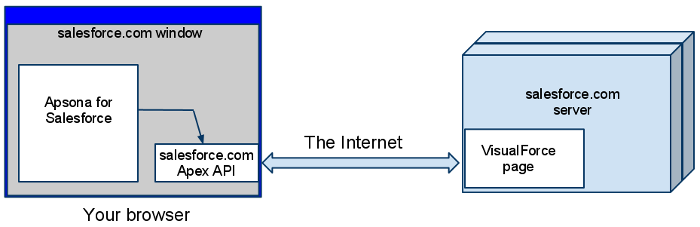
The software architecture of Apsona for Salesforce consists of
There are no triggers, validation rules, processes or other Salesforce components except the ones listed above.
Our software is structured to deliver the browser-side components from our servers whenever the browser needs them, i.e., at the very moment when the browser requests the Apsona for Salesforce tab from Salesforce. This architecture offers several benefits:
Conceptually, this delivery model is virtually identical to the Software-as-a-Service (SaaS) model that Salesforce itself uses, except that it is applied to browser-side software.
The core of our offering is a web application UI platform that constructs a rich Ajax-based user interface entirely based on metadata (i.e., descriptions of the objects such as their names, labels, field names and types). Our platform produces a user interface that addresses the most common data management use cases for web applications, such as the standard CRUD operations, import, export, reporting and analytics facilities. The metadata-driven architecture enables it to fully implement strong data validation at the individual field level (such as dates, phone numbers, email addresses, currencies and pick lists) as well as reference fields across multiple metadata objects. In addition, it exploits the reference field descriptions across the metadata objects to produce desirable features such as smart querying, filtering with arbitrarily many terms, reporting with multiple visualizations (lists, charts, pivots, and the like), child tabs, calendar views based on arbitrary dates, and lookup of cross-object references when importing or exporting data. The user interface also offers commonly-sought benefits such as retention of context, high responsiveness, lack of screen refresh, and a pleasing look and feel.
A large part of the platform is coded in JavaScript. It can run mostly in the browser, but we have also successfully deployed critical parts of it on the server side via the Rhino JavaScript engine for Java.
There are two other types of information that we do track. One is user information, containing the user’s full name, user name and email address, so that we can provision licenses for users. The second is usage information, such as the actions that users take within the application. For example, when clicks the “Add to Campaign” button, a call is made to the Apsona servers to log that action. Our usage logs enable us to quickly determine and proactively fix bugs in the software, as well as to focus our development and performance enhancement plans on the most-used and most-useful aspects of our applications.